
Finova.
Designer
Services
Mobile Design
Type
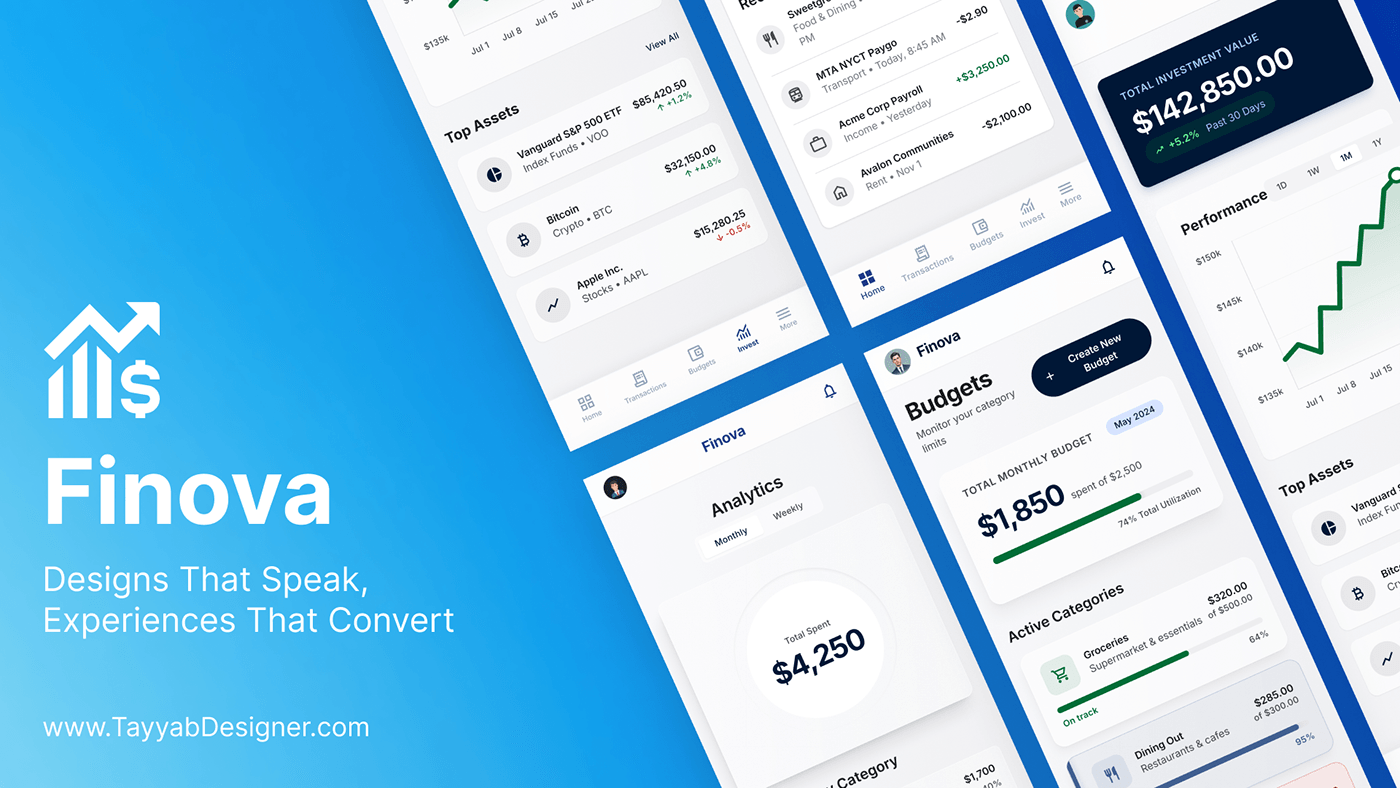
Finova is a modern personal finance mobile app designed to simplify how people track, manage, and understand their money. The goal was a clean, intuitive experience for anyone who finds traditional financial tools too complex.
Project overview.
Finova brings balances, spending, budgets and investments into one calm, readable dashboard — designed for people who find traditional banking and finance tools too complex.
| Project | Detail |
|---|---|
| Role | Lead UI/UX & Product Designer (end to end) |
| Services | UX Research, UI/UX Design, Mobile Design |
| Platform | iOS / Android mobile app |
| Tools | Figma, Adobe Illustrator |
| Published | May 2026 |
Designs that speak, experiences that convert.
The problem.
Most people's money lives in several places — a checking account, a second bank, a brokerage, maybe crypto — and no single tool gives them a clear picture of it.
- Fragmented view. Balances, spending and investments sit in separate apps, so users never see their full position.
- Data without meaning. Banking apps show long transaction lists but rarely answer the real question: where is my money going?
- Intimidating interfaces. Investment and budgeting tools are dense with jargon, tiny charts and too many options.
- Budgets that feel like punishment. Rigid setups are abandoned within weeks because progress is hard to read at a glance.
How might we give everyday users a single, calm place to see, understand and control their money — without needing financial expertise?
Goals and success criteria.
The goal was a finance app anyone can understand in five seconds: open it, know your balance, know where your money went, know if you're on track.
| Goal | In the design | Success looks like |
|---|---|---|
| One view of all money | Connected accounts and total balance on the home screen | Total balance found without navigating |
| Understandable spending | Category breakdowns, weekly insight, Monthly/Weekly toggle | Users can name their top spending category |
| Motivating budgets | Progress bars and "on track" states per category | A budget created in under 2 minutes |
| Approachable investing | Plain-language portfolio value and a simple trend chart | Gain or loss read correctly at a glance |
| Trust | Calm visual language and consistent money states | The app feels safe and credible |
Research.
Research focused on why people avoid or abandon finance apps, and what a "clear" money picture means to non-experts.
Methods
- User interviews — conversations with young professionals and freelancers about how they track money today.
- Competitor audit — banking, budgeting and investing apps reviewed for navigation, data density and tone.
- Desk research — common pain points in personal finance tools and app-store reviews.
Competitor audit
| App type | What works | Where it falls short |
|---|---|---|
| Bank apps | Trusted, accurate balances | One bank only; transaction lists without insight |
| Budgeting apps | Strong categorisation | Setup-heavy; budgets feel restrictive |
| Investing apps | Live portfolio data | Jargon and dense charts intimidate beginners |
Key insights
- Users check their balance first and everything else second — the home screen must answer "how much do I have?" instantly.
- People think in categories (food, housing, transport), not merchant names.
- Progress feels better than limits: a filling bar motivates more than a red warning.
- Investment data is welcome when it is one big number and one simple trend line.
- Trust comes from calm visuals, consistent gain/loss colours and recognisable account logos.
Who we designed for.
| Sara, 27 — Young professional | Omar, 34 — Freelancer | |
|---|---|---|
| Situation | Salaried, two bank accounts, starting to invest | Irregular income from several clients and platforms |
| Goal | Save consistently and grow a small portfolio | Know what he can spend each month without stress |
| Frustration | Can't see total net worth in one place | Spending surprises at month end; budgets don't fit his income |
| Needs from Finova | Combined balance, simple investment view | Category budgets with clear progress and weekly insights |
Personas are archetypes synthesised from the research themes above.
Information architecture and flows.
The app is organised around five bottom tabs, with Home as the hub that answers "how much do I have?" before anything else.
Primary user flows
- Check my money: Open app → Home → total balance and weekly insight → tap an account for detail.
- Understand spending: Home → Analytics → switch Monthly/Weekly → open a category.
- Set a budget: Budgets → Create New Budget → pick category and limit → track the progress bar.
- Review investments: Invest → portfolio value → change time range → open a top asset.
Wireframes and iteration.
Low-fidelity wireframes in Figma tested layout and hierarchy before any colour was applied.
- Home: early versions led with a transaction list; iteration moved the total balance and quick actions (Deposit, Send) to the top, with the weekly insight chart directly below.
- Analytics: a single donut showing total spent replaced several small charts, with a Monthly/Weekly toggle and a ranked category list underneath.
- Budgets: cards evolved from plain numbers to progress bars with "spent of total" and a percentage, so status reads without maths.
- Invest: portfolio value became one dark hero card, followed by a single performance line with 1D / 1W / 1M / 1Y / All ranges.
Visual design and design system.
The visual language aims for calm confidence: generous white space, one strong blue brand colour and clear signals for money moving in and out.
| Element | Decision | Why |
|---|---|---|
| Brand colour | Vivid blue gradient | Signals trust and technology; carries the brand |
| Hero cards | Deep navy for portfolio value | Gives the most important number weight and focus |
| Money states | Green for gains and income, red for losses and overspend | Instantly readable, consistent on every screen |
| Typography | Bold large numerals, light supporting labels | Balances and totals are read first |
| Cards | Rounded white cards on a soft grey background | Groups information into scannable blocks |
| Icons | Simple line icons per category | Category recognition without reading |
| Navigation | Bottom tabs: Home, Transactions, Budgets, Invest, More | Core tasks one tap away |
Balance cards, category rows with progress bars, chart cards, segmented toggles and account tiles were built as reusable Figma components, so every screen shares the same spacing, type scale and colour tokens.
Key screens and features.
| Screen | What the user gets |
|---|---|
| Onboarding | One clear promise — accounts, investments and expenses in one dashboard — and a single Get Started button |
| Home | Total balance, Deposit and Send actions, a weekly spending insight, connected bank accounts and recent transactions |
| Transactions | Merchant, category, time and amount per entry, with income in green |
| Analytics | Total spent in a donut, Monthly/Weekly toggle, and spending by category with amount and share |
| Budgets | Total monthly budget against its limit, Create New Budget, and category progress bars with an "On track" state |
| Invest | Total investment value with 30-day change, a performance chart with time ranges, and top assets across ETFs, crypto and stocks |
Validation and refinements.
The clickable Figma prototype was built around four core tasks, each tied to a goal above, and the design was checked against them before visual polish.
| Task | What we checked |
|---|---|
| Find your total balance | Time to answer; any navigation needed |
| Name your biggest spending category this month | Whether Analytics was found and read correctly |
| Create a new budget | Steps and hesitation points |
| Tell whether your portfolio is up or down | Correct reading of the hero card and chart |
Refinements made
- Made the Monthly/Weekly toggle more visible.
- Added percentage labels beside category progress bars so status doesn't rely on colour alone.
- Kept the gain/loss figure next to the portfolio value instead of only on the chart.
Outcomes and learnings.
Finova delivers a complete, consistent mobile finance experience: six core screens, a reusable component system, and a visual language that makes money states readable at a glance.
Learnings
- In finance, hierarchy is trust: the one number a user came for must be the largest thing on screen.
- Colour must carry meaning consistently — green and red are never decorative.
- Progress framing makes budgeting feel like a goal, not a restriction.
Next steps
- Savings goals with milestones
- Smart alerts for unusual spending and upcoming bills
- Dark mode
- Accessibility audit — contrast, dynamic type, screen readers
- Developer handoff and design-token documentation