
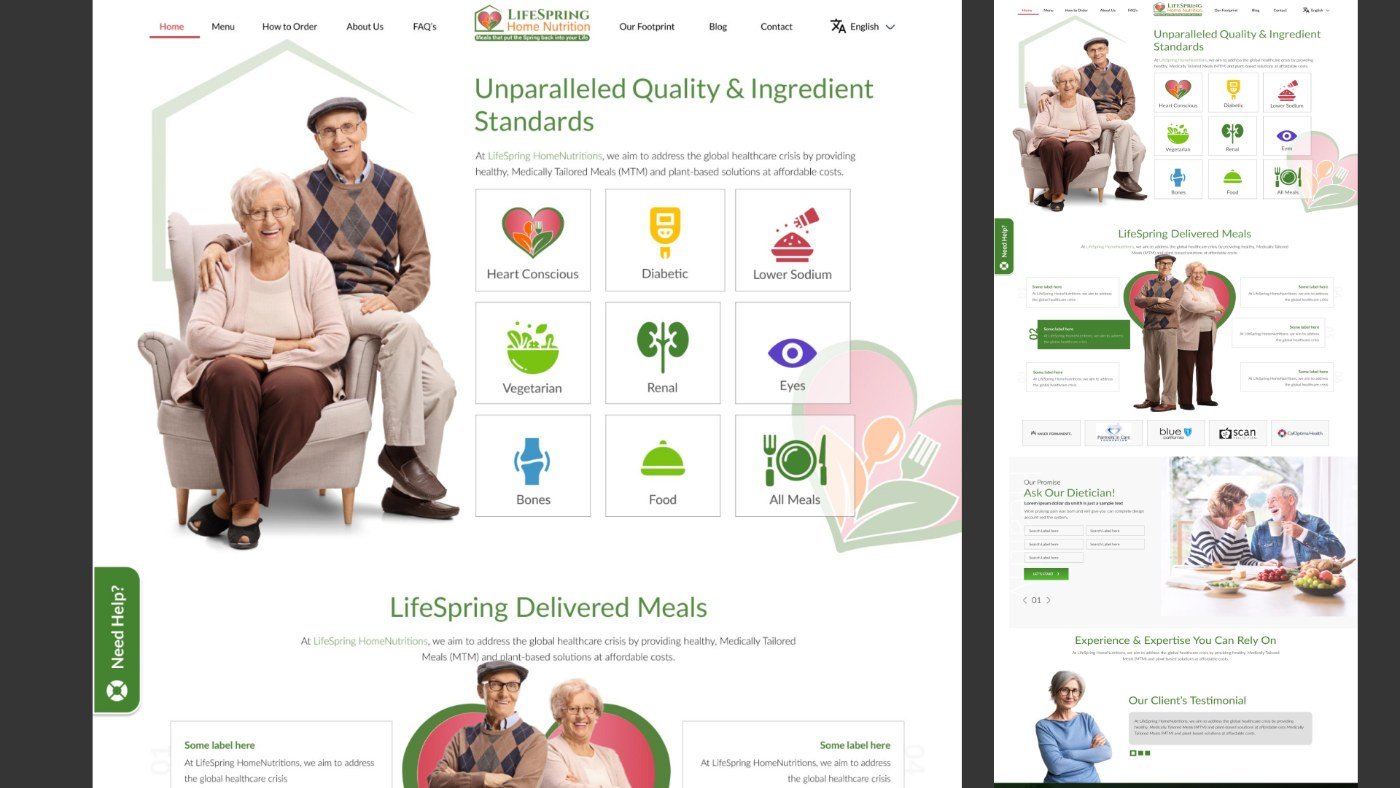
Project overview.
A landing page for LifeSpring Home Nutrition, a medically tailored meal (MTM) service. The job was to take complex dietary and health information and turn it into a page people can understand, trust and act on.
| Project | Detail |
|---|---|
| Role | UI/UX Designer (end to end) |
| Client | LifeSpring Home Nutrition |
| Services | UX Strategy, UI/UX Design, Web Design |
| Platform | Responsive marketing website / landing page |
| Tools | Figma, Adobe Photoshop, Adobe Illustrator |
| Published | November 2023 |
Clarity builds trust, and trust converts.
The problem.
People looking for medically tailored meals are often managing a health condition, or caring for someone who is. Online, they meet unclear messaging, too much information and little reason to trust a health-related service.
- Unclear audience. Many platforms never say plainly who the service is for, so visitors can’t tell if it fits their needs.
- Hidden process. How ordering, delivery and dietary matching work is buried or never explained.
- Weak trust. Health and food claims arrive without credentials, partners or real faces behind them.
- Overload. Dense dietary detail adds cognitive load, and visitors hesitate and drop off before converting.
How might we explain a medical meal service so clearly that someone with specific dietary needs feels confident taking the next step?
Goals and success criteria.
The landing page had one job: help the right visitor understand the service, believe in it and act, without wading through medical jargon.
| Goal | In the design | Success looks like |
|---|---|---|
| Communicate the value | Hero with a clear value proposition and primary CTA above the fold | Visitors can say what the service is in seconds |
| Show who it’s for | Condition categories: Heart Conscious, Diabetic, Lower Sodium, Renal and more | Users find their own dietary need on the first screen |
| Explain the process | Step-by-step “LifeSpring Delivered Meals” section | No guessing about how meals reach the door |
| Build trust | Health-plan partner logos, expertise section, warm real-life imagery | The service feels credible and safe |
| Reduce friction | Short “Ask Our Dietician” form and repeated CTAs | A clear next step wherever the user stops scrolling |
Who we designed for.
| Audience | What they need | What the page must show |
|---|---|---|
| People with specific dietary or medical needs | Meals that fit a condition such as diabetes, kidney or heart health | Their condition, named and easy to find |
| Health-conscious users | Structured meal plans they don’t have to work out themselves | Quality and ingredient standards, and meal options |
| Busy professionals | Convenient, healthy food delivered without effort | How delivery works, and a quick way to start |
The three audience groups share one need: certainty that the meals are right for them before they commit.
Design approach.
The answer to confusion was clarity, hierarchy and a guided flow down the page.
- Simplified the hero to one clear value proposition and one primary action.
- Broke dense information into structured, scannable sections.
- Used strong visual hierarchy (type scale, spacing and contrast) for readability.
- Placed CTAs strategically and repeated them down the page.
- Kept the UI clean and minimal to lower cognitive load for an audience that includes older adults.
Information architecture and flow.
The page is a single guided story: what it is, who it’s for, how it works, why to trust it, and what to do next.
Primary user flows
- Find my diet: Hero → condition categories → pick a category (e.g. Diabetic) → view matching meals.
- Understand the service: Hero → LifeSpring Delivered Meals → how MTM and plant-based meals are delivered.
- Get expert advice: Scroll to Ask Our Dietician → fill the short form → Let’s Start.
- Check credibility: Partner logos → Experience & Expertise → footer contact and newsletter.
Key design decisions.
| Decision | In the design | Why |
|---|---|---|
| Clear value proposition | Hero headline about quality and ingredient standards, with seniors and a primary CTA | Purpose is understood immediately |
| Visual hierarchy | Large green headings, generous spacing, short supporting copy | Guides attention down the page in order |
| CTA placement | Primary CTA above the fold, repeated in the dietician form and later sections | A next step is always in reach |
| Content simplification | Conditions as an icon grid; process as numbered points | Complex dietary info becomes digestible |
| Trust building | Partner logos, expertise section, real-life imagery and a persistent “Need Help?” tab | Lowers hesitation for a health-related purchase |
Visual design and style guide.
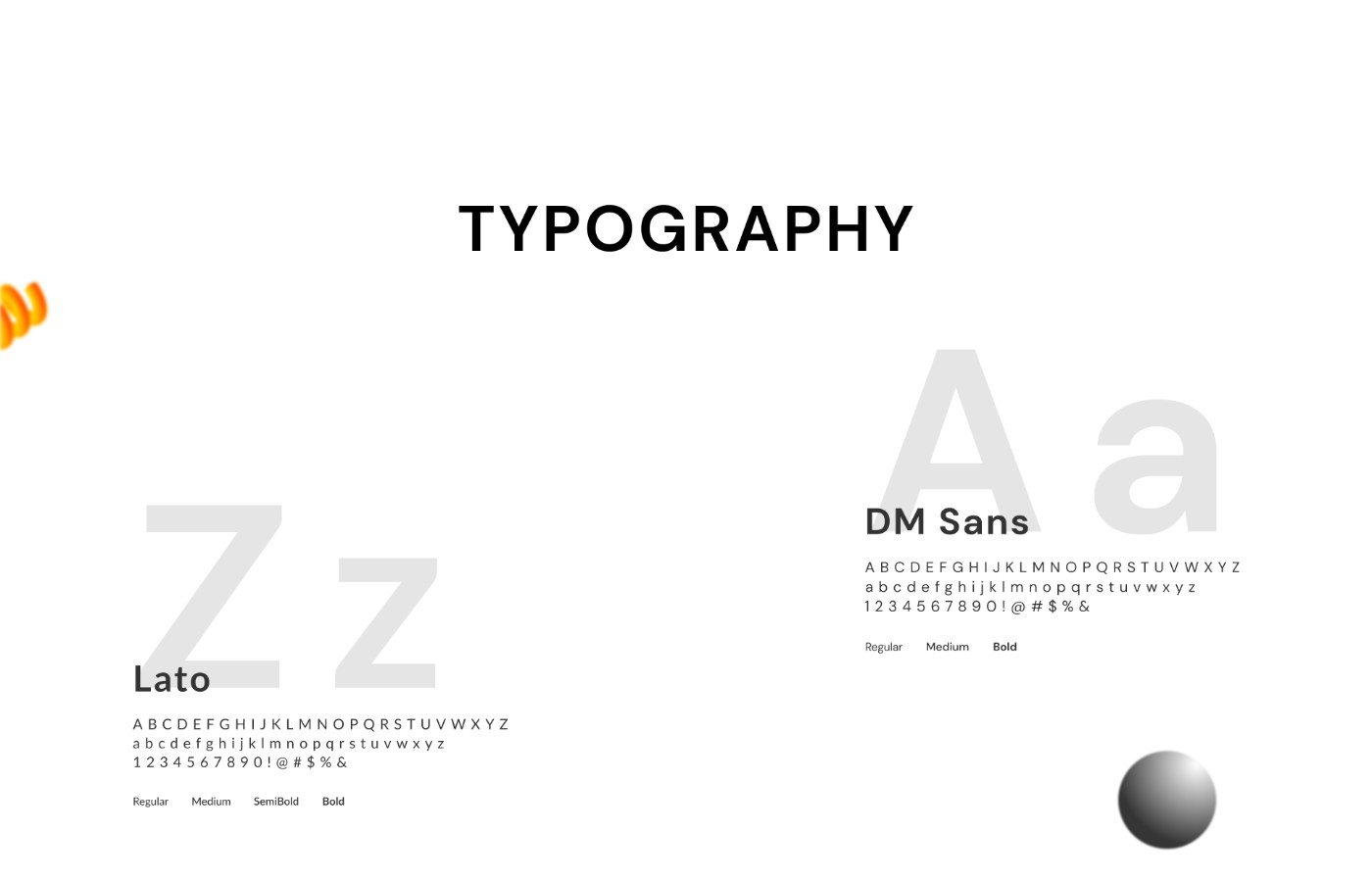
The visual language aims for fresh, calm and trustworthy: a healthy green, a warm accent and plenty of white space.
| Element | Decision | Why |
|---|---|---|
| Primary colour | Green #448430 | Health, freshness and nutrition; carries headings and CTAs |
| Accent colour | Rose #DA5365 | Warmth and care; used in the heart motif |
| Neutrals | Light grey #E6E6E6, charcoal #383837 | Soft section backgrounds and highly readable body text |
| Typography | Lato and DM Sans | Clean, friendly and legible at every size |
| Iconography | Simple coloured icons per health condition | Users recognise their need without reading |
| Imagery | Real seniors and real meals | Makes the service human and relatable |
Final landing page.
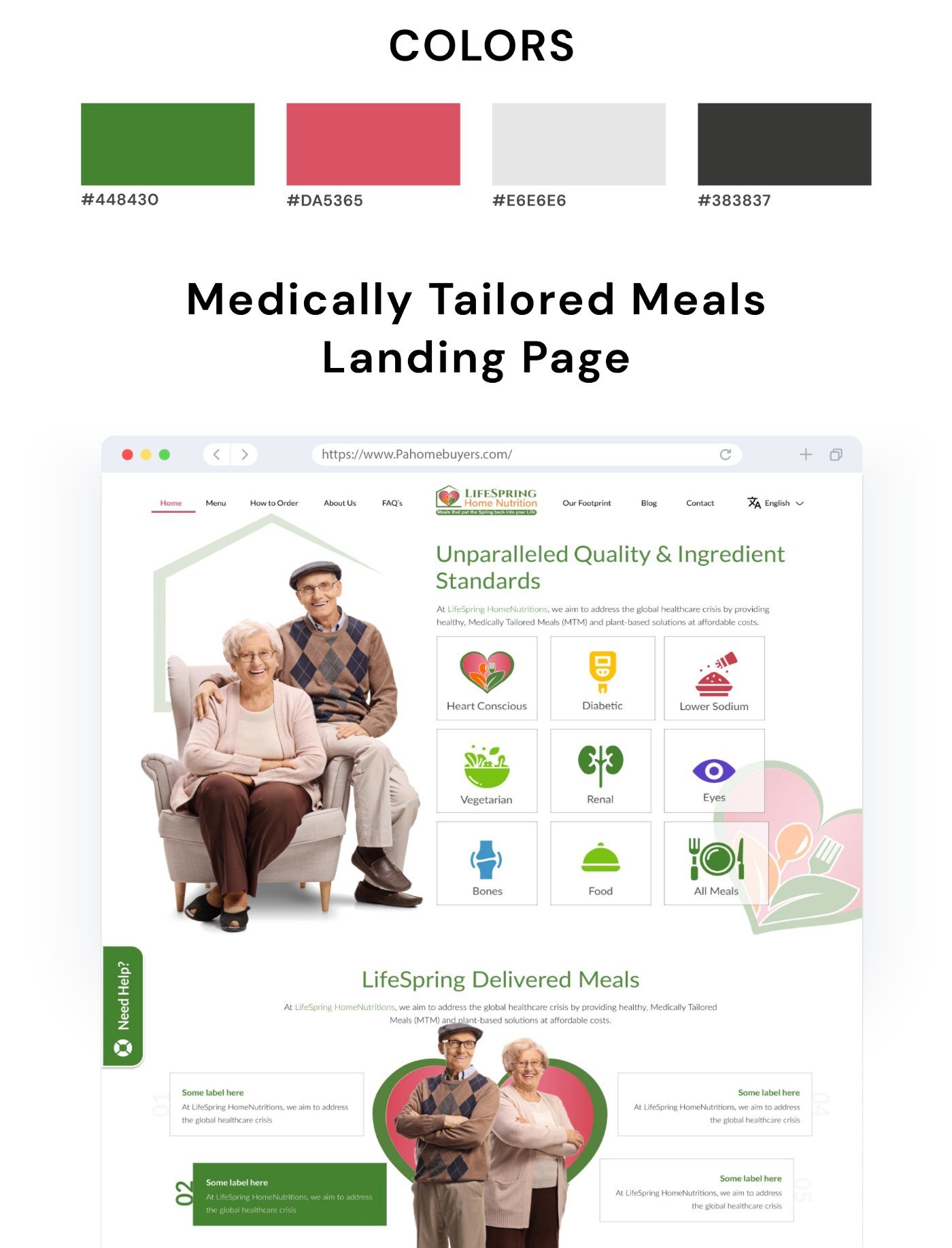
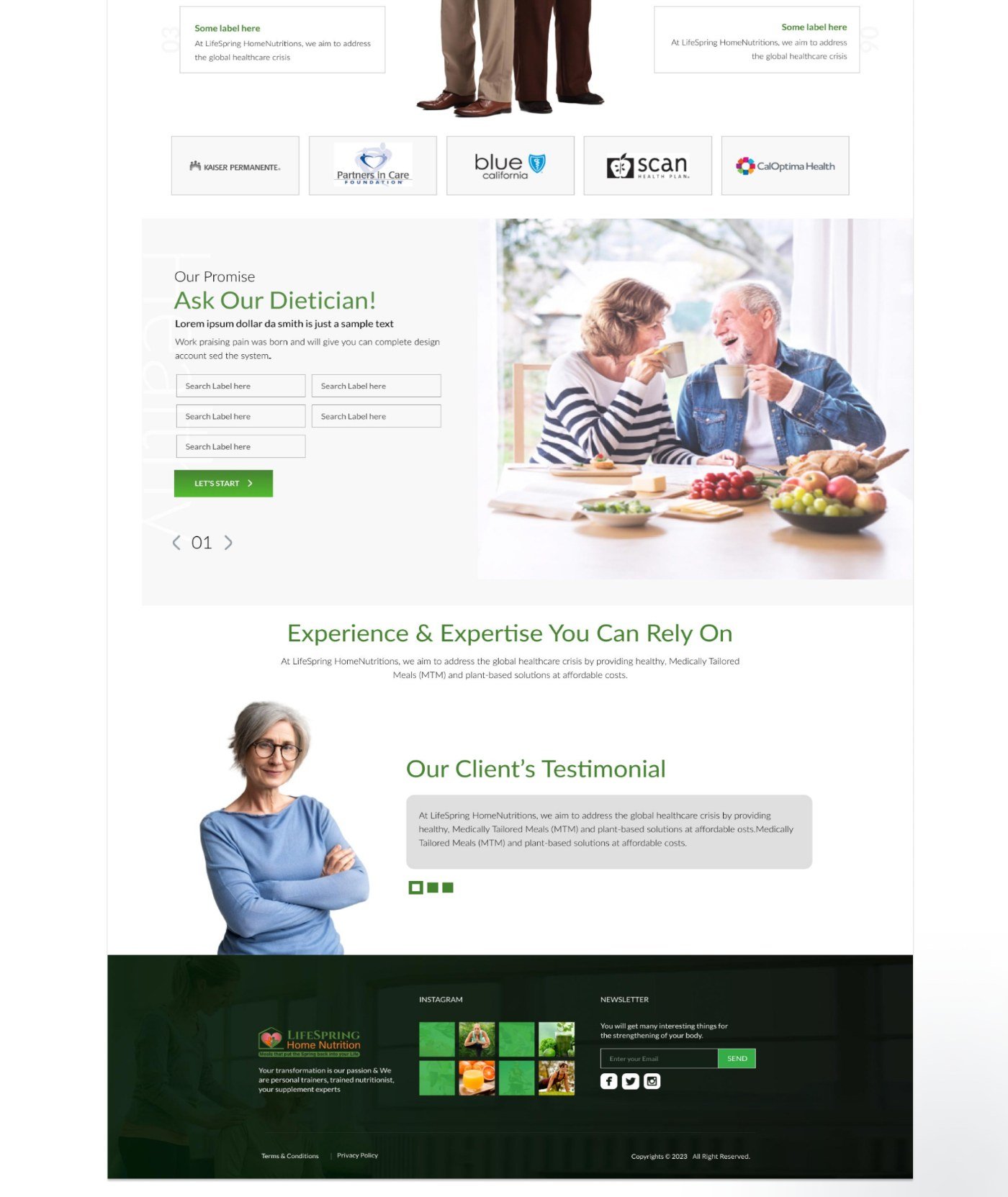
| Section | What the user gets |
|---|---|
| Navigation | Home, Menu, How It Works, About, FAQs, Blog and Contact, plus a language switch |
| Hero | A clear promise on quality and ingredient standards, with a primary CTA |
| Condition categories | Heart Conscious, Diabetic, Lower Sodium, Vegetarian, Renal, Eyes, Bones and All Meals as icon tiles |
| Delivered Meals | Healthy MTM and plant-based meals at affordable costs, explained step by step |
| Partners | Recognisable health-plan and provider logos |
| Ask Our Dietician | A short form with a single “Let’s Start” action |
| Footer | Newsletter sign-up, social links and an Instagram grid |
Outcomes and learnings.
The redesign turns a complex health service into a simple, guided experience: a clearer offer, less confusion and a page built around trust and action.
Design outcomes
- Improved clarity of the service offering.
- Reduced confusion through a structured layout.
- Designed for conversion with strong, repeated CTA placement.
- Stronger trust through a clean, professional look.
Learnings
- In health services, trust has to be designed, not assumed: partners, faces and credentials do real work.
- Let users find themselves first: naming their condition beats describing the product.
- Every section should end with a clear next step.
Next steps
- Usability testing with people managing dietary conditions
- Accessibility audit for older users: contrast, type size and tap targets
- Meal browsing and ordering flow
- Mobile-first refinement of the condition grid and form
- A/B testing of hero messaging and CTA copy